Core Concepts
Overview · Subject · Match · Target · Condition
ObChecked audits are built using a structured rule hierarchy.
This hierarchy allows complex validation rules to be constructed in a clear and modular way. Each level progressively narrows the scope of the rule until a specific value can be evaluated.
The audit structure follows this sequence:
Group → Subject → Match → Target → Condition
Understanding how these nodes work together is the key to building effective audit definitions.
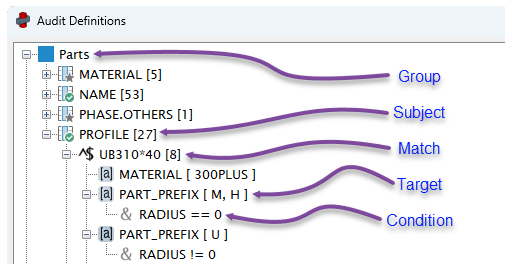
Audit Definition form excerpt showing an example of each node in sequence.
Group
Audit rules are first organised by their object type (Parts, Bolts, Components), because they have access to different model object properties.
Groups do not perform validation themselves. Instead, they act as containers for the rules that follow.
Subject
A Subject defines the main property that determines if a row/object is recognised and able to be audited.
Subjects are a container for a collection of Match nodes, because audit rules may vary for different values of the subject cell.
For example, a subject column may be PROFILE, so each Match node in a subject will try to match a different type of PROFILE.
Subjects are the starting point for rule logic.
See: Subject
Match
A Match node simply identifies a recognised Subject value.
Matches evaluate the value in the subject cell and decide whether the rule continues.
Matches can use basic wildcards for batch matching.
- e.g.
PL*to matchPLATE8*200
Matches can also use regex for complex matching.
- e.g.
^(PLATE)(\d{1,2})\*(\d{2,4})$to matchPLATE10*200and return10and200for use in conditions
Matches are a container for a collection of Target nodes, which are run on a successful match of the subject cell.
See: Match
Target
Each Target defines one cell that will be validated if the match condition is satisfied.
Target nodes have several methods to determine how a cell is audited, and provides a variety of possible outcomes for each audit.
Target nodes can compare the value of its cell against a list of acceptable strings, a range of acceptable numbers, comparisons against other cells or direct checks against being empty/not empty.
See: Target
Condition
A Condition is a way to limit a Target node to only run under certain conditions.
This is to allow several Target nodes for the same cell, but are instructed to run under different conditions.
For example, available stock lengths of a profile may be dependent on the profile depth, UB200*18 vs UB310*40. By using a different condition under each Target node, you can control which max length rules applies to which profile depth.
See: Condition
How the Hierarchy Works
Each level in the hierarchy refines the rule.
Example:
Subject: PROFILE
Match: ^(UB)(\d{3})\*(\d{2,3})$
Target: LENGTH_NET, max 18000
  Condition: matchNumber[0]>200
Target: LENGTH_NET, max 12000
  Condition: matchNumber[0]<=200
In this example:
- The subject PROFILE will try to match the profile of two parts.
- The match detects a
UB310*40and aUB200*18 - The first target applies a max length of 18000
- The condition only applies it to the
UB310*40(matchNumber[0]: 310 > 200) - If the length is <= 18000, it gets flagged OKAY, otherwise it gets flagged ERROR
- The condition only applies it to the
- The second target applies a max length of 12000
- The condition only applies it to the
UB200*18(matchNUmber[0]: 200 <= 200) - If the length is <= 12000, it gets flagged OKAY, otherwise it gets flagged ERROR
- The condition only applies it to the
Why the Hierarchy Exists
Separating rule logic into these layers allows audits to remain flexible and reusable.
Rather than creating many separate rules, a single subject can branch into multiple matches, targets, and conditions.
This makes it possible to define complex modelling standards in a structured and maintainable way.