Configuration
Overview · Firm Folder · Column Definitions · File Locations
ObChecked reads configuration from three locations, in order of increasing specificity:
- Application Root – inside
Environments\common\ - Firm Folder – if defined in Tekla advanced options
- Model Folder – the current model directory
These locations follow standard Tekla conventions, where more specific locations override broader ones.
- Why Configuration Matters - Many auditing features rely on properly defined column data.
Before audit rules can be applied, ObChecked needs to know:
- where configuration files are stored
- how column data should be interpreted
Configuration controls how object properties are read, where shared definitions are loaded from, and how rules behave across users and projects.
To support this, ObChecked separates configuration into layers so that shared office standards can coexist with project-specific overrides.
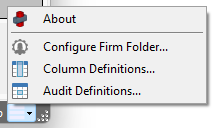
Access all properties via the main menu in the bottom right corner
Application Root
The application root is the default configuration location bundled with ObChecked.
If no firm or model configuration is present, ObChecked will fall back to this location.
This location is usually found inside the current Envrionments\common\extensions\ObChecked2\
This layer is typically used for:
- personal defaults
- baseline column definitions
- development or testing setups
Install of ObChecked will only install default files if a valid configuration is not found, e.g. on first install.
ColumnConfig.json defines a valid configuration. If this file is present, ObChecked will not install default config or audit files.
Group_SUBJECT.aud defines each audit subject for each group. These will only be created if ColumnConfig.json is not present. Default files will not overwrite existing files.
If you want a clean install of a new version with new default system files, these will need to be manually removed before running ObChecked.
This was to ensure updates to a new version does not overwrite previously modified files.
Firm Folder
The firm folder allows configuration to be shared across multiple users within an organisation.
When defined, ObChecked can read configuration from a shared network location resolved from Tekla’s firm environment. This allows teams to maintain consistent column definitions and audit rule sets.
Typical uses include:
- shared audit rule libraries
- standardised column definitions
- office-wide validation rules
The firm folder must be configured before it can be used. Once configured, definitions can be promoted to this location so they are available to all connected users.
Following Tekla convention, if a configuration is found inside the Firm folder and not in the Model folder, this is automatically taken as the active directory.
Model Folder
The model folder allows configuration to be overridden for a specific project.
This layer is useful when a particular model requires different rules or columns that should not affect other projects or office standards.
Examples include:
- project-specific audit rules
- special naming conventions
- temporary validation checks
Following Tekla convention, if a configuration is found inside the Model folder, this is automatically taken as the active directory.
Configuration Types
Several parts of ObChecked rely on configuration files. These include:
- Column Definitions – defines how object properties are read and interpreted
- Audit Definitions – rule sets used to validate objects
These configuration files can exist in any of the three configuration layers.
Why Configuration Matters
Many auditing features rely on properly defined column data. Column definitions determine:
- which Tekla properties are available in the grid
- the datatype used when evaluating values
- how numeric values are formatted and compared
- which columns can be referenced by audit rules
Because of this, column definitions are typically the first step when setting up ObChecked.
Recommended Setup Order
When configuring ObChecked for a new environment, the following order is recommended:
- Define the Firm Folder location (if applicable)
- Configure Column Definitions
- Define or import Audit Rules
Following this order ensures that shared configuration is established before rules and columns are created.
Limitations
Unfortunately there is no way to specify some here, some there. We hope to one day include a way to have main settings available in Firm, and only specific audits available from model, but at the moment this is not yet achievable.