Configuration
Overview · Firm Folder · Column Definitions · File Locations
Firm Folder
ObChecked supports using a shared firm folder so configuration files can be maintained centrally and accessed by multiple users.
If Tekla’s XS_FIRM environment variable is defined and accessible, the Configure Firm Folder dialog becomes available in ObChecked.
This allows users to define a shared location inside the firm’s Tekla environment where ObChecked configuration files can be stored.
Purpose of the Firm Folder
The firm folder allows teams to maintain consistent configuration across multiple workstations.
Typical items stored in the firm folder include:
- Column Definitions
- Audit Rule Definitions
- Shared configuration files
Once configured, updates made to these files can be shared across all users connected to the same firm environment.
Firm Folder Structure
Although the firm folder root is defined by Tekla, it is recommended to create a dedicated subdirectory for ObChecked.
Example:
XS_FIRM
└─ ObChecked
  ├─ ColumnConfig.json
  ├─ Parts_PROFILE.aud
  └─ etc...
This keeps ObChecked configuration separate from other Tekla environment files.
The subdirectory can be customised to suit the structure of your firm’s environment.
Subdirectory Configuration
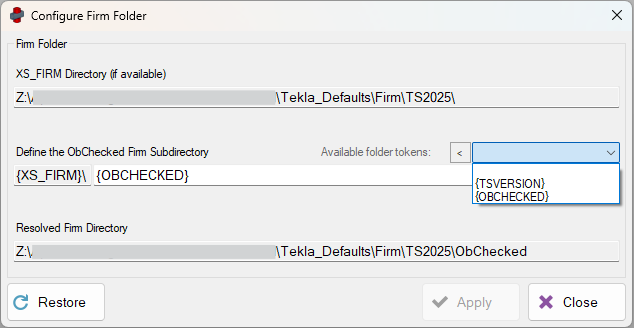
The dialog allows a custom subdirectory path to be specified inside the firm folder.
This makes it possible to:
- store configuration in a dedicated ObChecked folder
- organise configurations by Tekla version
- adapt to existing firm folder structures
Tokens
The subdirectory path supports tokens, which can automatically resolve environment values.
Currently supported tokens include:
| Token | Description |
|---|---|
{TSVERSION} |
Inserts the current Tekla version |
{OBCHECKED} |
Inserts the default ObChecked subdirectory name |
A dropdown menu is available in the dialog to insert supported tokens.
Note: The Tekla version token may currently include the service pack version. Future updates may simplify this to the main version number only.
It is also possible that the Tekla version is already included in the Firm folder path in which case it may not be necessary to include.
If separated by Tekla version, changes in one version will not apply to another version. At the moment, changes will need to be made in each version independently.
If your XS_FIRM folder is already different for each version of Tekla, it is possible to begin the subdirectory value with ..\ thereby using the parent directory of the firm folder. Doing this, will allow you to use one ObChecked configuration for all versions of Tekla. As long as your columns and audits remain consistent across these versions, this may be an effective way to reduce the amount of double-handling for each installed version of Tekla.
Additional tokens may be added in future releases if required.
Folder Preview
The dialog includes a preview field showing the resolved firm folder path based on the current settings.
This preview helps confirm:
- the correct folder structure
- token resolution
- final directory location
Creating the Folder
If the resolved directory does not exist, the dialog will display a Create button.
Selecting this will create the required directories inside the firm folder so ObChecked can store configuration files there.
Workstation Setup
The firm folder configuration must be set up on each workstation running ObChecked.
Once configured correctly, the shared folder allows:
- column definitions to be updated centrally
- audit rules to be shared across users
- configuration changes to propagate more easily across the team
Related Configuration
See also: